Book an Appointment
Call Green Valley Computer Repair Service at 520-526-9940
                   

(520) 526-9940

*


Green Valley Computer Repair Service has been providing the best mobile business computer repair in Green Valley, AZ and the greater Tucson Metro Area since 1999. The term "mobile" means we come to you to resolve all your computer problems.

We repair business computer systems including laptops, desktops, PCs, and Apple computers. One of our highly qualified staff will come to you, often the same day, to take care of all your repair needs.

Why not use the #1 rated business for computer repair in Green Valley, AZ?

Computer Repair 4.9 / 5 stars from 236 reviews
Why use a computer tech when you can have a Green Valley based Computer Engineer? Mon-Sun 8:00am - 8:00pm

Call us at (520) 526-9940

Text us at (520) 526-9940

Email us your questions

Book an Appointment

"Very impressed - well done. Will highly recommend. Good customer service, no wait time. "
Green Valley Computer Repair Service 5 / 5 stars
"Matt was on time, efficient, listened and responded to what I needed, and extremely helpful. I will use the company's services again in the future."
Green Valley Computer Repair Service 5 / 5 stars
"Very professional and help me with everything that I needed help on. Very satisfied!"
Green Valley Computer Repair Service 5 / 5 stars
"William did a great job trying to figure out the Facebook / Google insanity.. I appreciate his efforts.."
Green Valley Computer Repair Service 5 / 5 stars
"Rob explained everything that he was doing and did a great job fixing my computer."
Green Valley Computer Repair Service 5 / 5 stars

Who is Green Valley Computer Repair Service?

Green Valley Computer Repair Service is owned by Matt Karls, an Electrical Engineer and a Computer Systems Engineer. We are a team of computer professionals focused on service and quality, all our work is guaranteed.

If you have any computer, technology or IT problem in Green Valley, AZ we can fix it. We have been performing computer repair in Green Valley full time since 1999. Feel free to give us a call or text us at (520) 526-9940.

Green Valley Computer Repair Service's Computer Engineer

What is your Service Area for on-site Computer Repair?

We have serviced Green Valley and the entire Tucson metro area for over a decade.

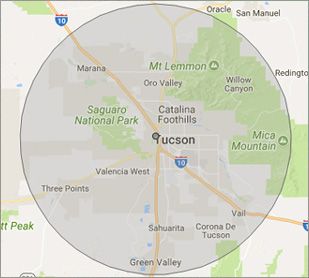
Our primary on-site mobile service area includes Green Valley, AZ, most of the Tucson metropolitan area and the Phoenix metropolitan area.

We provide remote and mobile computer repair in Green Valley, Casas Adobes, Catalina Foothills, Oro Valley, Marana, Sahuarita, Drexel Heights, Catalina, Tanque Verde, Vail, Valencia West, Corona de Tucson, and Rincon Valley.

Our on-site Computer Service Area

What should someone expect that hires you for Computer Service?

Our mission is to fully resolve your computer problems quickly and affordably. If you want a Computer Engineer that can fix all of your computer problems instead of a computer tech, a computer geek, a technician or a computer guy that can only fix some of your problems; call us at (520) 526-9940.  

What types of Computer Services do you perform?

We Service businesses and business clients, including:
 
  • Diagnose / repair hardware or software problems
  • Spyware, malware, trojan and virus removal
  • Setup wireless and small business networks
  • Laptop repair, PC repair and Apple repair
  • Hard drive data recovery

Green Valley Computer Repair Service Contact Information

Green Valley Computer Repair Service
(520) 526-9940

Green Valley Computer Repair Service is a Karls Technology company

* *
*
*
*
  *
* *


*
*
* * * * * * * * * * * * * * *
4.9 / 5 stars from 236 reviews

"The service was prompt and professional and the price was right! Thank you very much!"

Green Valley Computer Repair Service 5 / 5 stars

"Tech took time to install a terabit from an older computer and took the unwanted computer away. Should I need assistance in the future, I will contact."

Green Valley Computer Repair Service 5 / 5 stars

"Chris did a great job. Was very polite and worked steadily till all the work was fully completed."

Green Valley Computer Repair Service 5 / 5 stars

"Can't say enough of what was right. It was a great experience with wonderful support. I felt the service was well priced and that Matt had my best interests in mind with everything he did. Amazing service and I have already begun referring others."

Green Valley Computer Repair Service 5 / 5 stars
Best Antivirus Software of 2026: The Ultimate Guide to Cybersecurity Brands

In 2026, the digital threat landscape has shifted. We are no longer just fighting simple viruses; we are defending against AI-generated phishing, sophisticated ransomware-as-a-service, and complex identity theft. Choosing the right antivirus brand is no longer optional—it is the foundation of your digital life. At Karls Technology, we’ve analyzed the top-performing security suites of the […] The post Best Antivirus Software of 2026: The Ultimate Guide to Cybersecurity Brands appeared first on Computer Repair Blog.

How to Hide Documents on your PC

There are instances when we have sensitive files that we’d prefer to keep hidden from prying eyes. There is an uncomplicated method is effective and can be used in such a scenario. Here’s how to hide documents: Right-click on the document Go to Properties Click the Hidden option and hit apply If you ever have […] The post How to Hide Documents on your PC appeared first on Computer Repair Blog.

End of Service for Windows 10 21H1

Windows 10 21H1 will be discontinued in three months, on December 13, 2022, as per a notice sent out to customers by Microsoft. Microsoft announced the end of security updates for devices running Windows 10 21H1 (the May 2021 Update) in an article released on Wednesday. In order to protect themselves from attacks that take […] The post End of Service for Windows 10 21H1 appeared first on Computer Repair Blog.

Windows Search Tool

Windows search is the most efficient method to utilize when looking for certain files, documents, or applications using a keyword. As a short cut, it gets the job done well. Windows 11 systems use a “magnifying glass” symbol for Windows Search on the taskbar, while Windows 10 computers feature a search box. If you type […] The post Windows Search Tool appeared first on Computer Repair Blog.

Southwest Airlines changes $8 internet prices

Southwest Airlines has recently announced a change in its in-flight internet pricing model, shifting from an $8 daily internet fee to an $8 per flight segment internet access fee. This decision has sparked conversation and interest from consumers... The post Southwest Airlines changes $8 internet prices appeared first on Computer Repair Blog.

Start Menu Customization

A lot of stuff can be shown or hidden in the Start menu within the Windows operating system. This leaves users a bit of wiggle room for customization. By opening the Settings app, you can navigate to the Personalization section. Then when selecting Start, you may toggle the Start menu’s use of your most recently […] The post Start Menu Customization appeared first on Computer Repair Blog.

Windows OS Hibernation

A feature of the Windows operating system that can be found in both desktop computers and laptops is called hibernation. It is possible to program it to take place automatically if a battery alert goes out. Its primary function, with regard to desktop computers, is to act as an all-around method for conserving energy. Because […] The post Windows OS Hibernation appeared first on Computer Repair Blog.

Upgrade to Windows 11 now or wait longer?

Windows 11 is the latest operating system from Microsoft, first released in 2022. This updated version of Windows was highly anticipated by the millions of users around the world who have been eagerly waiting for it. In this article, we will take a closer look at Windows 11 and what it has to offer. First […] The post Upgrade to Windows 11 now or wait longer? appeared first on Computer Repair Blog.

New Microsoft Defender SmartScreen Feature

In an effort to ward off phishing attacks and encourage users to use strong passwords, Microsoft released Defender SmartScreen. The Windows 11 22H2 update, which Microsoft issued at the end of the previous month, included a new feature that should make it easier for users to keep their credentials secure. When logging into an app […] The post New Microsoft Defender SmartScreen Feature appeared first on Computer Repair Blog.

Chrome’s ‘Pin a Tab’ Feature

People that use their browser frequently and have numerous tabs open at once may benefit from the “Pin a Tab” feature on the Google Chrome browser. To quickly access your most-used tabs, you can “pin” them to the leftmost position in the browser’s navigation bar. Since the name of each tab must be the same […] The post Chrome’s ‘Pin a Tab’ Feature appeared first on Computer Repair Blog.